iPhone & Android · now on the App Store and Google Play
Know exactly what to eat today.
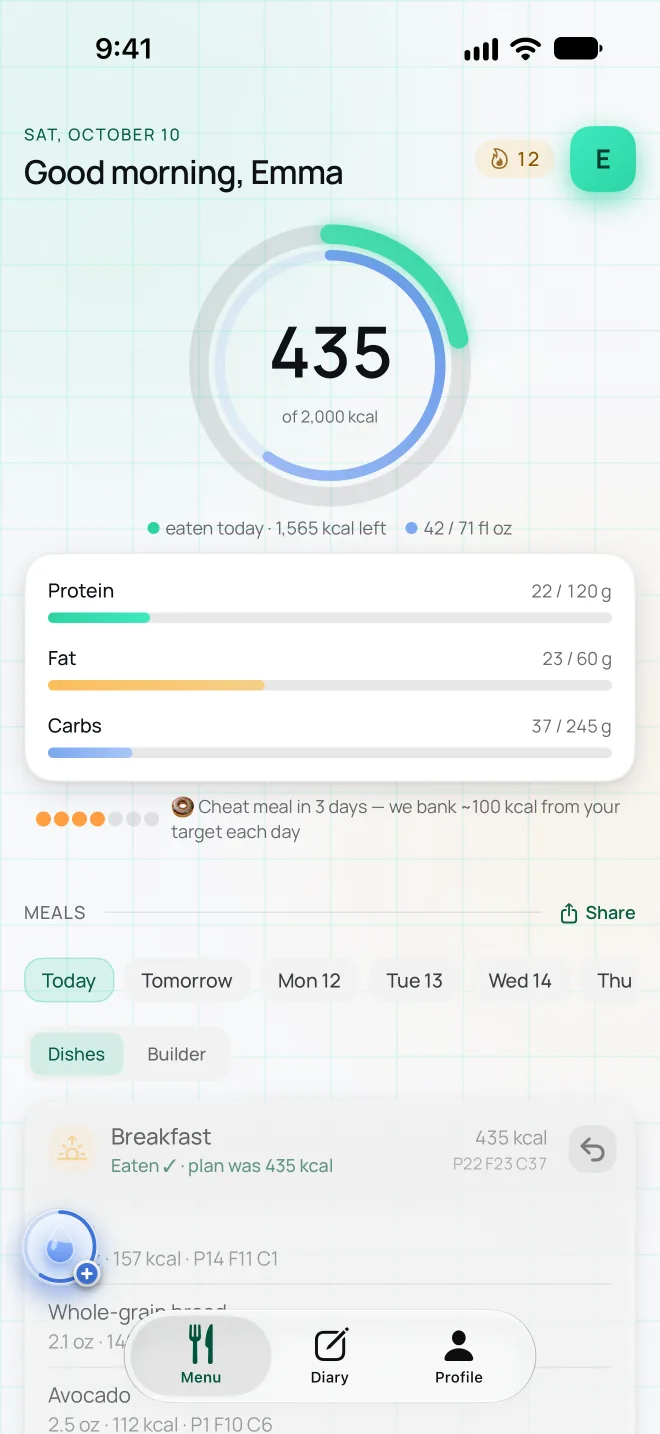
NutriBot works out your calorie and macro targets from your body and goal, then builds a ready daily menu around your diet. Log everything else in seconds — and ask the coach when you’re not sure.
NutriBot does the planning and the counting, so eating to your goal stops being a second job.
Targets built from your body
Calories, protein, fat and carbs from your sex, age, height, weight, activity and body type — for losing weight, maintaining or gaining muscle. Plus a daily water guide.
1,850kcal
125 gprotein
62 gfat
205 gcarbs
A ready menu, every day
Breakfast to dinner, put together from foods you like and portioned to your targets. Not into a dish? Swap one product or reroll the whole meal in a tap.
Swap a product
Reroll a meal
Plan up to a week ahead
Adapts to what you ate
Chef’s dishes with recipes
Craving something more exciting? Pick ratatouille, curry or bolognese with a recipe — the portion fits your target and the rest of the day adjusts.
Your diet, respected
Vegan, vegetarian or pescatarian, halal or kosher, foods you don’t eat, allergies and other food restrictions — the menu follows them.
Log anything in seconds
Search about 60,000 foods, scan a barcode, or snap a photo for an AI estimate. Foods you eat often are always one tap away.
NutriBot, your AI coach
It knows your targets and what you’ve eaten. Ask what to have for dinner, how much is left today, or for a review of your week.
Optional
Progress you can see
Set a weight goal and get an estimated date at a safe pace. Weekly, monthly and yearly reports, weight charts and trophies keep you going.
Family menu & shopping list
One menu for the whole family — the same dishes, portions matched to each person’s goal — and a shopping list built from the plan.
Water tracking
Smart reminders
Achievements
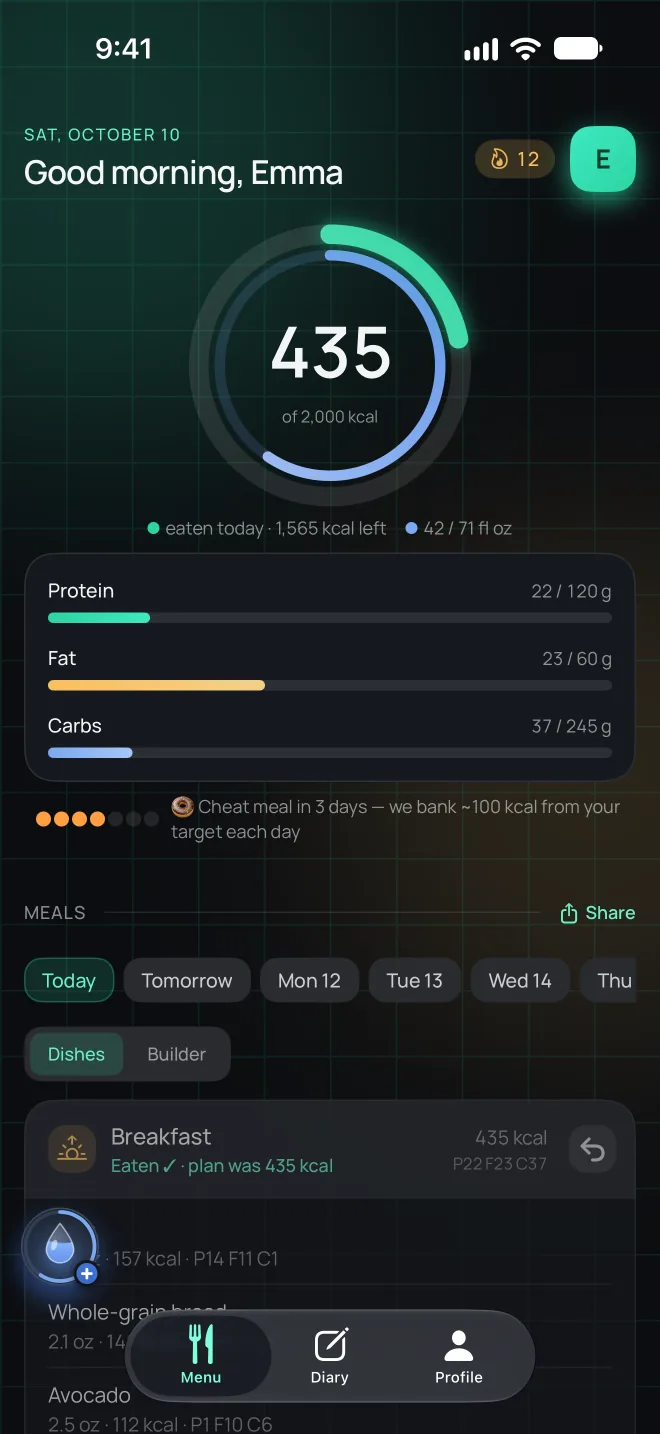
Light & dark theme
Data export & deletion
How it works
Your plan in three steps
1
Tell NutriBot about you
Sex, age, height, weight, activity and goal — plus a diet you follow or anything you don’t eat.
2
Get your plan
Your calorie and macro targets, a water guide and a ready menu for today — with recipes and a shopping list.
3
Eat, log, adjust
Follow the menu or log what you actually ate. If lunch runs over, the rest of the day gets lighter so you stay on target.
Languages
Speaks your language
Menus, dish names and the coach — in 11 languages.
English
Українська
Deutsch
Français
Español
Italiano
Polski
Português (Brasil)
Português (Portugal)
Türkçe
Azərbaycanca
Metric or imperial — kilograms or pounds, centimetres or feet and inches.
NutriBot is available now on the App Store (iPhone) and Google Play (Android).
How are my calories and macros calculated?
Your daily energy is calculated with the Mifflin–St Jeor formula from your sex, age, height and weight, then adjusted for your activity, body type and goal. Protein and fat are set per kilogram of body weight, and carbohydrates make up the rest.
Is the menu made by AI?
No. Your daily menu is put together from nutrition templates for your targets and diet, so it’s balanced and predictable. AI helps only where it’s useful — recognising food in photos, the coach and recipes — and you can use NutriBot without it.
Does it work for vegan, vegetarian, halal or kosher diets?
Yes. Choose vegan, vegetarian or pescatarian, halal or kosher, and cross out any foods you don’t eat — they won’t appear in your menu. Vegan and vegetarian menus get their protein from foods like tofu, tempeh, legumes, eggs and dairy. We can’t verify halal or kosher certification, so choose products labelled accordingly.
I have special dietary needs. Can I use NutriBot?
You can set your diet, allergies, foods you avoid or a fluid limit, and the menu will follow them. NutriBot isn’t a medical service, though — if your doctor has given you dietary advice, agree your diet with them.
Can I log food that isn’t on my menu?
Of course. Find it among about 60,000 foods, scan a barcode or take a photo. Your remaining meals then adjust so the day still adds up to your target.
What happens to my data?
Your data is used to build your plan, and health data only with your explicit consent. You can export everything as a file or delete your account in Settings at any time. This website uses no cookies, trackers or analytics.
Available now
Be among the first to try NutriBot
NutriBot is on the App Store for iPhone and on Google Play for Android.